Index Editor
The Index Editor provides index fields for adding index values to documents based on the selected Document Type, and is only available from the Index Panel.
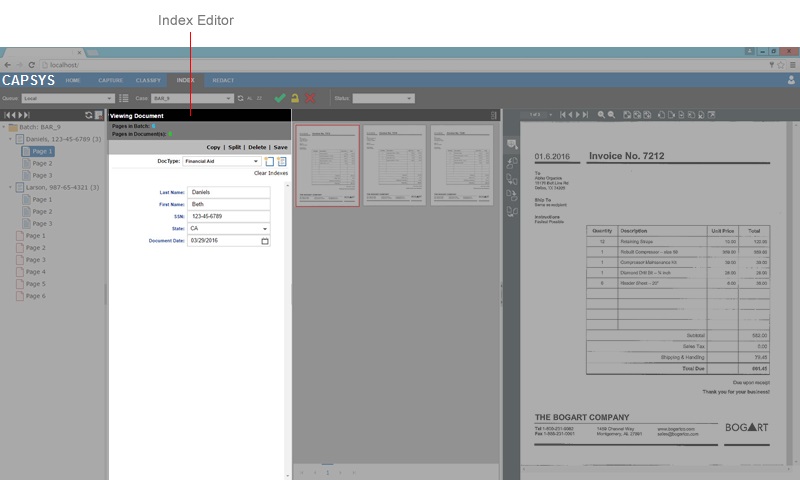
Figure 1 - Index Editor
Index Editor Controls
The Index Editor Controls are used to create new documents, add or edit existing document index values, and append batch pages to an existing document. Index fields may have additional properties as defined by an administrator that restrict entry to certain characters or formats, and may be configured as pick lists or database lookup fields.
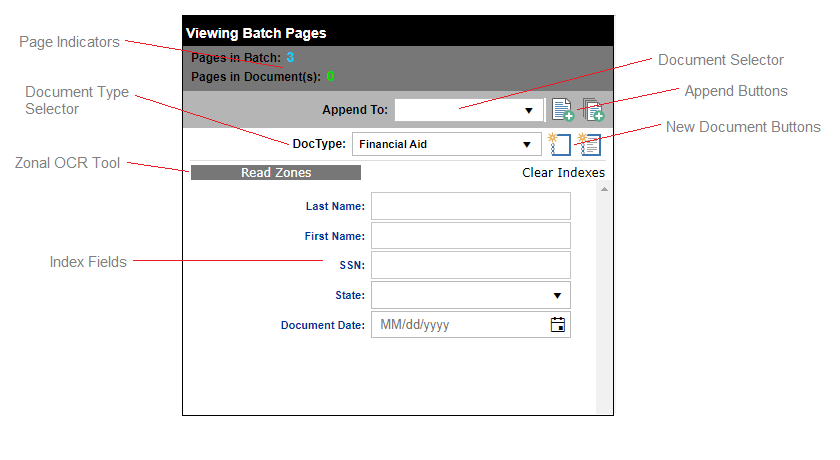
Figure 2 - Index Editor Controls
Index Editor Controls
- Page Indicators - Displays the current number of pages in the batch and/or selected document.
- Document Type Selector - Selects the current Document Type. The index fields displayed will change corresponding to the selected Document Type.
- Zonal OCR Tool - Will OCR all fields that have defined OCR zones and populate the OCR data into fields (requires an additional license)
- Index Fields - One or more fields or data entry controls for holding an index field value.
- Document Selector - Selects a document for appending.
- Append Buttons - Used for appending the current batch page, or all batch pages to the selected document.
- New Document Buttons - Used for creating a new document with no pages, or a new document from the currently selected batch page.
- Clear Indexes - Clears the contents of all index fields.
Related Topics: